What is The Dark or Deep Web?
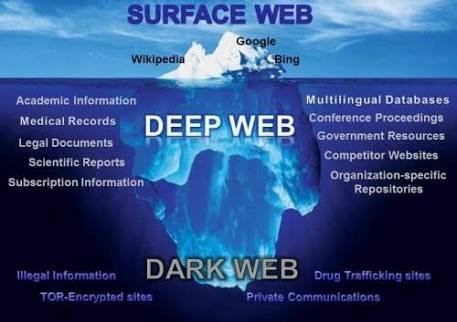
Your normal internet is said to be only the tip of the iceberg. 90% of the internet takes place in the Dark Web.
The darknet uses an encryption algorithm, to be able to visit the dark web, and the sites on it, you’d need Tor.
Who or What is On The Dark Web?

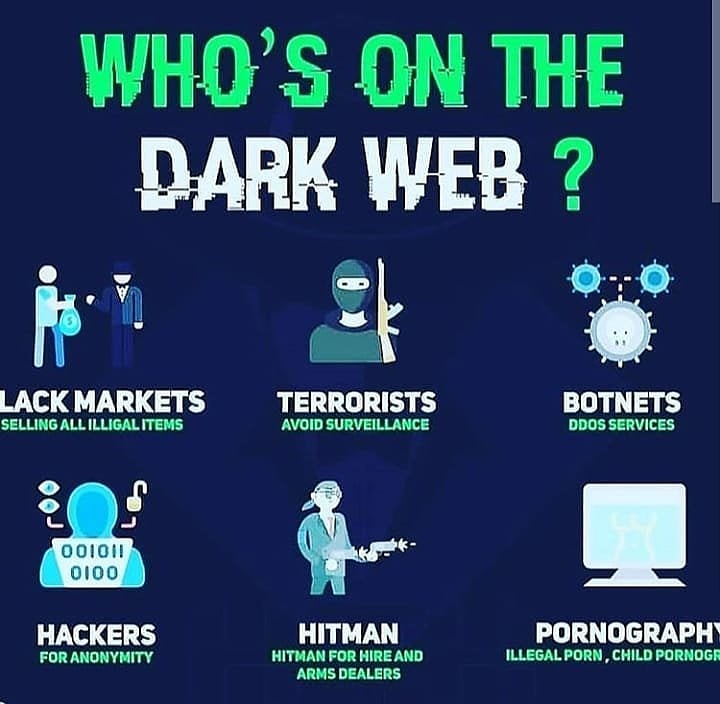
The contents of the Dark Web is made of Black Markets, selling all kinds of illegal stuff, Terrorists avoiding surveillance, Botnets, Hitman, Hackers aand Pornography, specifically, child pornography. As you can see, all these contents are illegal, which is why they use dark web. Since it’s all encrypted, thegovernment has no way of finding out who’s posting and who’s visiting, to prevent these crimes from happening.
The dark web is called dark web because it is made up of dark stuff, like incest, murder videos, child pornography, gore videos and more.
Aside from the dark and illegal nature of the Dark Web, there are also hackers in there. Which is another reason to be afraid of the Deep Web. Hackers can do sstuff to your Laptop and Phone. They ca hack you, get your personal information, stalk you and much more. People on YouTube have a lot of interesting stories about Hackers on Deep Web.
How do I access the dark web and stay safe?
To access the dark web, you’d need Tor.
How to get tor on Windows?
Method 1: Tor Browser
You can download the Tor Browser Bunde for windows for easy access to dark web. It comes as an EXE file, which you can install easily and start using.
Here are the steps to get tor browser setup and installed:

- Download the Tor Browser from here(official website)
- Once you have downloaded the browser, open the file.
- Choose your install location and click install. Note that you can install Tor Browser on a USB Stick
- After the installation is complete, ope the folder and run “Start Tor Browser.exe”
- A new window will open asking if you like to connect directly or want you want to setup proxies. (If your cosection is censored or filtered, you should setup proxy)
- Now simply click on “Connect”
- Congratulations, you are now conneced to internet through Tor Protocol and can visit .onion websites.
Method 2: Using an Extension
The above method is pretty simple and eeasy to set up. But in case you wanted to use Tor on your default browser(Chrome, Brave, or Firefox), you can do so by using an extension. There are plenty of Tor extensions for Chrome Browsers. Kronymous extension is recommended but you can choose any extension of your choice (jut type “Tor” on chrome extension page and search).
- Visit this link from Google Chrome on your laptop.
- Install the extension by clicking “add to desktop”
- Activate and turn on the extension to connect to internet through Tor.
- You are now connected through Tor and can visit onion sites.
Note: using an extension is not recommended since your still on your devault browser which has a fingerprint to it and therefore you can b tracked and identifiable.
How to get Tor on Android or iPhone?
If you don’t have a laptop around and like to visit the dark web, you can also do so on your phone. The Tor Project, a non profit organization, has released an application for visiting the dark web with your smartphone.
Here are the steps to install and setup the application on an Android Device.
- Open the Play Store app on your android phone and search “Tor Browser” or simply click on this link to be redirected to the page.
- Download and install the application.
- After you have installed the app, open it and click on “Connect”
- Wait a few seconds for the app to run the Tor Protocol and setup itself.
- After that, you are done and can now visit dark web sites. Remember that tor websites end with .onion, as opposed to normal connection whichend with .com or .net and etc
How do I stay safe in dark web?
The Tor Bundle makes everything includng your connection very safe and secure. Governments or internet providers can’t track or read your data, everything is encrypted. But there are stll additional steps you can take to make sure you are safe.
- If you dont trust your ISP(internet service provider), you should use Tor with a VPN for additional security.
- Don’t give any personal information, such as email address, username, phone number or home address, to anyone.
- Don’t fall for scams. There are a lot of scammers in the dark web, if your trying to make a purchase for something, make sure they are legit before transferring any funds.
- Don’t download or install any applications from dark web on your device. They can have virus or a RAT(Remote Access Trojan) embedded in them.

